Five more addons on the same engine
These modules extend SeekySense for Odoo, which already covers the CRM and the online shop. Two addons work with the OCA ticketing module helpdesk_mgmt; three work with the standard product, sales and purchase apps.
The mechanics are the ones of the CRM: Odoo serves each user a feed of the records they are allowed to read, the browser turns them into vectors and answers every search locally. Nothing is generated by a language model. Every suggestion, from a reply draft to a substitute product, is a real record written by a person, ranked by meaning.
Key facts
- Helpdesk: built on OCA helpdesk_mgmt 18.0, the ticketing of Odoo Community. Enterprise Helpdesk through an adapter, not tested yet.
- Products: works with product, sale_management and purchase, the three apps every company installs.
- No language model. Reply drafts, answers and substitutes are real records with their source.
- The browser finds, Odoo prices. Every price shown comes from the order's pricelist on the server.
- Record rules, portal rules and multi-company respected: each browser receives only what its user may read.
- Same server requirements as the CRM: no GPU, no pgvector, no AI subscription.
The same problem, a hundred wordings
A helpdesk is where the same issue arrives again and again, each time in different words. The agent who reads "parcel stuck at the hub since Monday" cannot find last week's "courier says the package is still in the depot". The customer who types "can I swap for a bigger size" on the portal is not told that the answer already exists. And the manager learns about the courier strike from next week's report.
The AI helpdesk assistants on the market send every ticket to an external language model: a cost per ticket, customer text leaving the company, and answers that may be invented. Support managers rarely accept the third point. SeekySense takes a different route: the memory of past tickets and of what fixed them, searched by meaning, in the agent's own browser.
Tickets like this, and what fixed them
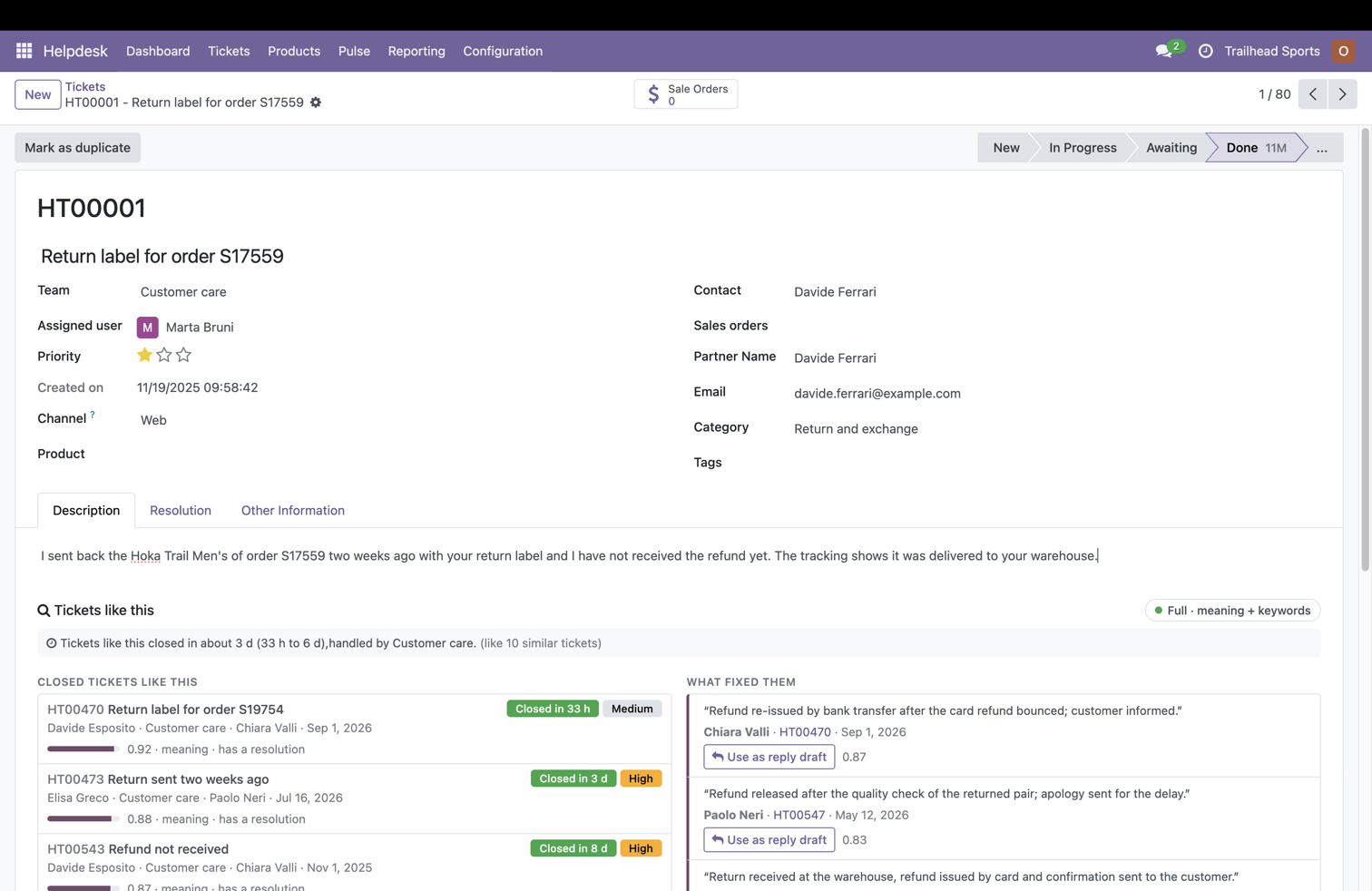
An agent opens a ticket: a customer sent back a pair of shoes with the return label two weeks ago and has not received the refund. Below the description, SeekySense lists the closed tickets that look like this one, with how long they took and who handled them. Here the line reads "Tickets like this closed in about 3 days, handled by Customer care".
Next to them, under What fixed them, are the resolutions those agents wrote: "Refund re-issued by bank transfer after the card refund bounced", "Refund released after the quality check of the returned pair". Each one has a Use as reply draft button that puts the text in the composer, with its source, for the agent to edit and send.
While the agent writes, a strip also suggests the team, the category and the priority read from the text, with the evidence. When the ticket is closed, a dialog proposes the resolution read from the thread, so the memory grows with every ticket.
Incidents seen in the first hour
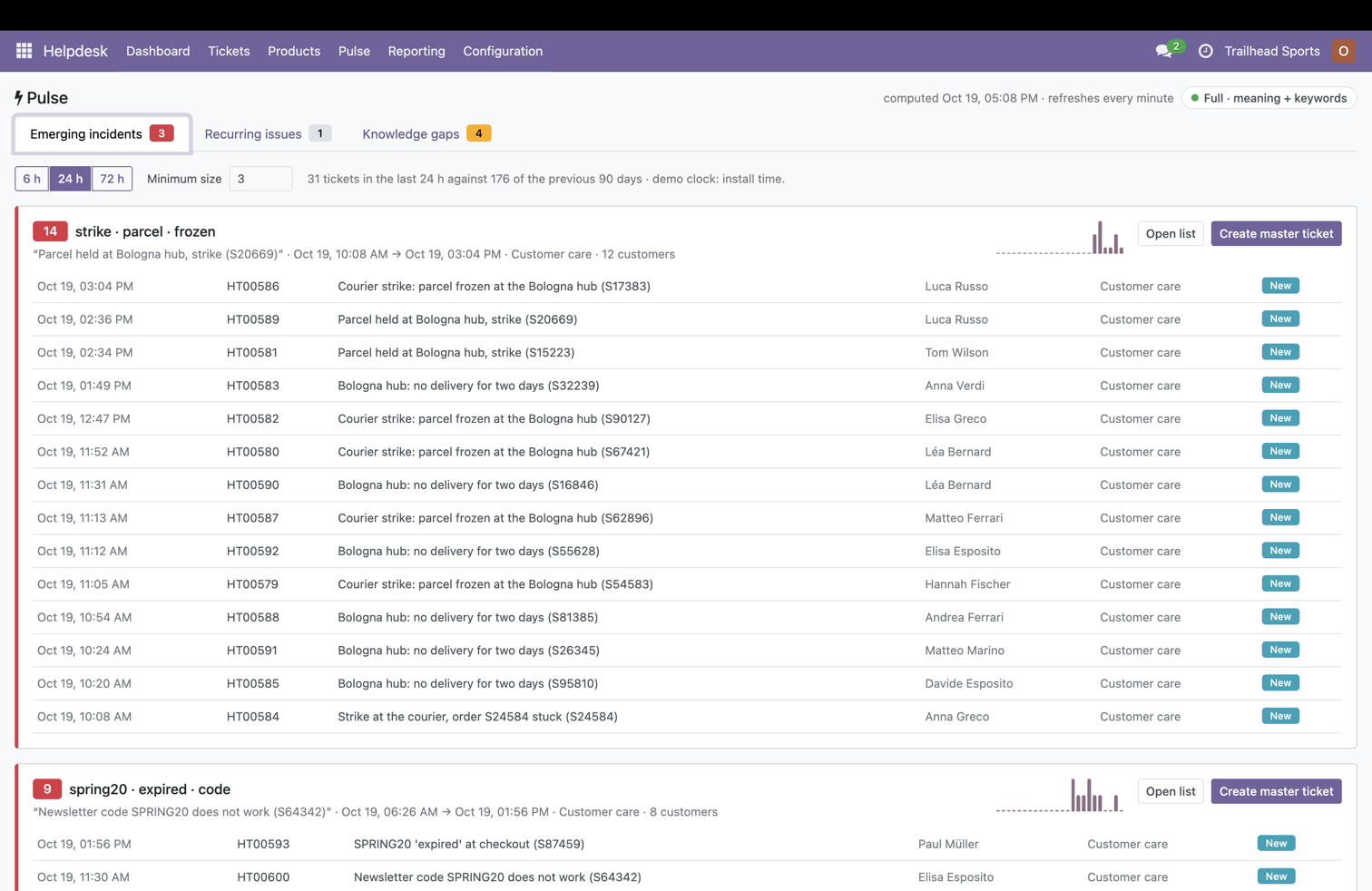
The Pulse view compares every new ticket with the tickets of the last hours and with the previous 90 days. A burst of similar tickets with no precedent is a new incident. In the screenshot, 31 tickets arrived in the last 24 hours against 176 in the previous 90 days, and Pulse groups 14 of them under "strike · parcel · frozen", from 12 customers, and 9 under "spring20 · expired · code".
Each incident shows the first and last arrival, the teams involved, a sparkline of arrivals per hour and the list of tickets. Create master ticket opens one ticket for the incident and links the others as duplicates, after confirmation.
The same view lists the recurring issues and the knowledge gaps: clusters of tickets that keep coming back with no public answer, each with a draft answer ready, written from the resolutions that solved them.
What customers write about, counted
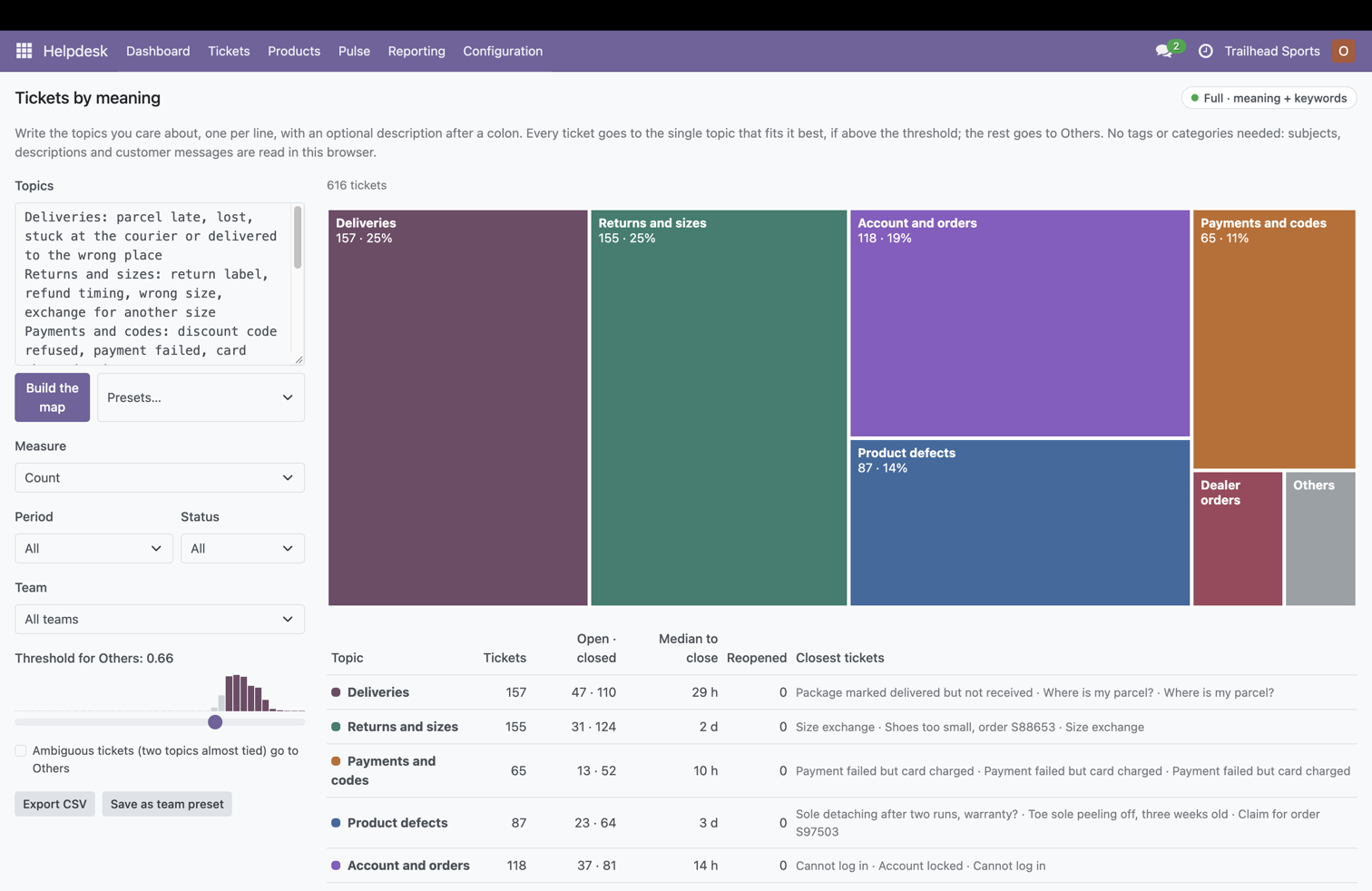
Tickets by meaning takes a few lines of text, one topic per line, and places every ticket under the topic it fits best, reading subjects, descriptions and customer messages. No tags or categories needed. In the demo, 616 tickets fall into deliveries (157), returns and sizes (155), account and orders (118), product defects (87), payments and codes (65) and dealer orders.
For each topic the table shows how many are open and closed, the median time to close (29 hours for deliveries, 2 days for returns, 10 hours for payments) and the tickets closest to its centre. Filter by period, team and status, click a topic to open the list, export the CSV.
The same reading is available on each customer: their tickets grouped by topic, the sentences they use most, and the open tickets that repeat a closed one.
Also in the helpdesk
Before you send
On the portal's new ticket form, the customer's browser searches the published answers while they type and shows the ones that match. "This solved it" closes the loop without a ticket. Sending anyway carries the suggested category and a note of what was shown.
You already have a ticket about this
A logged-in customer who starts writing about an open ticket is shown that ticket, with its stage, and can add the message there instead of opening a second one.
Routing audit
From the Ask dialog, a list of open tickets whose team or category disagrees with what the text says, with suggestions to apply in bulk after confirmation.
Knowledge base that writes itself
A knowledge gap becomes a draft public answer in one click: title from the central ticket, body from its resolution, phrasings from how customers asked. Publish it and the gap disappears from the next sync.
Search bar and Ask
"Search by meaning" in the standard ticket search bar, saved as a favourite that re-runs on current data. The Ask dialog answers one question with tickets, messages, resolutions and public answers together.
Any language, same rules
German, Italian, Spanish and French tickets are found by English questions on the Full engine, and a German resolution is inserted as written. An agent who may read only their own tickets gets suggestions from those only.
The catalogue in your words, not only in your codes
Odoo's product search looks at the name, the internal reference and the barcode. It serves the person who already knows the code. It fails the salesperson quoting a customer who wrote "a threaded brass fitting for high-pressure pipes, 50 pieces", the buyer receiving a vendor's price list in the vendor's language, and the warehouse operator asking "we have no more of this, what does the same job?".
These three addons bring the index of the shop inside the ERP, where the transactions are. The browser finds the product; Odoo prices it, with the order's pricelist, quantity and date, exactly as it would by hand.
Find a product by what it does, or by a photo
"Search by meaning" appears in every view that lists products: Inventory, Sales, and the Catalog of a quotation or a purchase order. "Something to keep the feet dry on a wet trail" finds the waterproof trail shoes and the gaiters; "calze a compressione per il recupero" finds the compression socks described in English. An exact code or barcode still comes first.
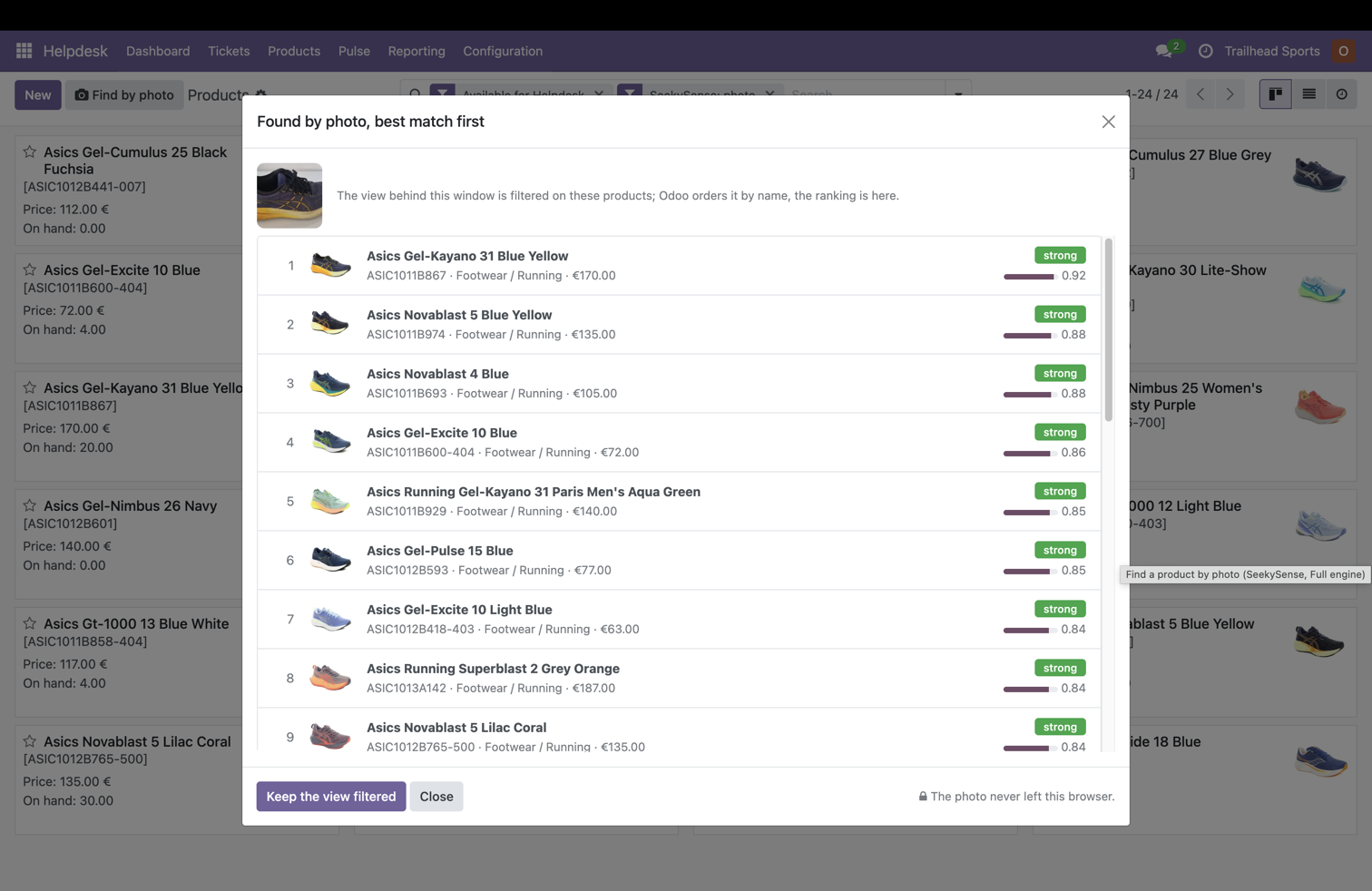
With the Full engine the product kanban also has Find by photo. A returned part, a sample on the counter, a picture sent by a customer: upload or take the photo, crop it, and the templates are ranked by resemblance. In the screenshot a navy shoe with an orange sole returns the Asics Gel-Kayano 31 first, with its code, category and price, then the models that look alike. The photo never leaves the browser.
Quote, replace, buy and clean up
Every proposed line is a real product, every price comes from a pricelist rule or a real past order, every equivalence names its source.
Quote in the customer's words
Paste the customer's email on a quotation. The request is split into items with quantity, size and colour; each one gets the matching product and variant, the pricelist price and the stock, with the sentence it answers. In the demo, a dealer email with five items in Italian and English gives five correct lines in one click.
Substitutes when out of stock
A quotation line with no free stock shows the in-stock products that do the same job, with the price difference on the order's pricelist, and replaces the product in one click. Confirmed equivalents are stored on the product and shown first from then on.
Price memory
On a line, what the company charged for products like this to customers like this: unit price, discount, date, customer and the median, with a flag when the line departs from the pattern. Nothing is written.
Revise a quotation lost on price
From a lost quotation, each line's cheaper equivalents of the same use, priced on the customer's pricelist, with the saving per line and in total. One click creates the revision. In the demo it comes out 12 to 25 % cheaper.
Reconcile a vendor price list
Choose the vendor, drop the CSV. Each row is mapped to an internal product by code, by the vendor's previous mappings and by meaning, in the vendor's language, with a confidence. One click creates or updates the vendor prices. In the demo, a German list with typos maps 96 % of its rows on the Full engine.
Alternatives at other vendors
On a purchase order line, the lines of other vendors that describe the same item, with price, minimum quantity and lead time. "Ask this vendor" opens a request for quotation with the line.
Goes well with
On the product form and under the quotation lines, the items sold together with this one in the history, filtered by meaning so that a related use comes before a random co-purchase. One click adds one.
Catalogue audit
Pairs that read as the same product, with their two codes and two prices. Products whose text reads as another category. Products without a usable description. Bulk actions after confirmation, never automatic.
Catalogue by meaning
The catalogue grouped on topics written in plain words, such as winter, race day, beginners or spare parts, with count, stock value and last year's revenue per topic. A treemap, a table and a CSV.
Same engine, same server requirements
Odoo serves JSON feeds of the records each user may read; the browser computes the vectors with WebGPU or WebAssembly, keeps them locally and answers in milliseconds. Prices and stock come from two small server routes that run Odoo's own engine. The details are on the main Odoo page.
| Addon | Depends on | What it adds |
|---|---|---|
seekysense_helpdesk |
OCA helpdesk_mgmt, seekysense_core |
Tickets like this, what fixed them, reply draft, routing hint, resolution on close, Ask the helpdesk, search bar, Pulse, knowledge gaps, public answers, Tickets by meaning, customer voice |
seekysense_helpdesk_portal |
seekysense_helpdesk, portal |
"Before you send" answers on the portal form, your own open ticket on the same subject, category and context carried into the ticket |
seekysense_product |
product, seekysense_core |
Search by meaning on product views and catalogues, Find by photo, equivalents and complements, Catalogue by meaning, Catalogue audit, price and stock routes |
seekysense_sale |
sale_management, seekysense_product |
Quote in the customer's words, substitutes on out-of-stock lines, price memory, revision of a lost quotation, goes well with |
seekysense_purchase |
purchase, seekysense_product |
Vendor price list reconciliation, alternatives at other vendors, search by meaning on vendor pricelists |
Standard inheritance only. No Odoo core file and no OCA file is modified; uninstalling leaves everything as it was. Costs are never embedded, and the consent dialog says what is processed in the browser.
Questions about the helpdesk and product modules
How can I add AI to Odoo Helpdesk without sending tickets to an external language model?
Install SeekySense for Odoo Helpdesk on top of the OCA helpdesk_mgmt module. Odoo sends each agent a feed of the tickets, messages and resolutions they may read, and the agent's browser turns them into vectors and answers locally. No ticket is sent to an external model, and nothing is generated: every suggested reply is the text an agent wrote for a similar ticket, shown with its source.
Does SeekySense generate replies to tickets?
No. The reply draft is the resolution of a similar closed ticket, written by a real agent, inserted in the composer with its source and edited by a person before sending. There is no language model, so there are no invented answers, no cost per ticket and nothing to audit.
How does the helpdesk detect an incident?
The manager's browser compares each new ticket with the tickets of the last hours and with the previous 90 days. A burst of similar new tickets with no precedent is shown as an emerging incident in the Pulse view, with its size, the customers involved and a sparkline of arrivals. One click creates a master ticket and links the others as duplicates.
Can customers find the answer before opening a ticket?
Yes. On the portal's new ticket form, while the customer types, the browser searches the published answers and shows up to three that match, plus the customer's own open ticket on the same subject. The customer can mark that the answer solved it, or send the ticket anyway; in that case the ticket arrives with the suggested category and a note of the answers shown.
Which helpdesk does SeekySense support?
The OCA module helpdesk_mgmt on Odoo 18 Community, which gives ticketing to Community installations. The Odoo Enterprise Helpdesk app is reachable through an adapter that is not tested yet. Contact us for Odoo 17 and 19.
Can Odoo build a quotation from a customer's email?
Yes. On a quotation, Quote in the customer's words takes the pasted email, splits it into items with quantity, size and colour, and proposes for each one the product and variant that match, with the price of the order's pricelist and the stock. The salesperson keeps, changes or drops each line and adds them in one click. Prices are computed by Odoo's pricelist engine on the server, never in the browser.
Can I search Odoo products with a photo?
Yes, on the Full engine. The product kanban has a Find by photo button: upload, paste or take a picture, crop it, and the templates are ranked by similarity with their images. Words can be added to refine. The photo never leaves the browser.
How does the vendor price list reconciliation work?
The buyer chooses the vendor and pastes the rows or drops a CSV. Each row is matched to an internal product by code, by previous mappings of that vendor and by meaning, in the vendor's language, with a confidence. Rows above the confidence are pre-checked, the others are fixed with a product picker, and one click creates or updates the vendor prices in Odoo. Re-importing the same list updates and duplicates nothing.