Search Odoo by meaning, not by exact words
SeekySense for Odoo finds the deals, notes and products people are looking for, even when nobody wrote those words, and even in another language. The AI runs in the browser, so your Odoo server stays exactly as it is.
What is SeekySense for Odoo?
SeekySense for Odoo is a set of Odoo addons that adds search by meaning to the CRM and to the online shop, and search by photo to the shop. It works on the text your team already writes: opportunity titles, descriptions, chatter notes and product pages.
The language model does not run on your server. Odoo sends each user the records they are allowed to read, and the browser turns them into vectors, keeps them locally and answers every search in milliseconds. Nothing typed or shown at search time is sent anywhere.
Key facts
- Built and tested on Odoo 18 Community, with the standard CRM and Website Sale apps.
- Installs like any Odoo app. No core file is modified, and uninstalling leaves Odoo as it was.
- The server needs no GPU, no pgvector, no embedding service and no AI subscription.
- Understands more than 100 languages with the Full engine, so an English search finds Italian and German notes.
- Follows Odoo record rules: a salesperson only searches the deals they can see.
- Shop customers can search with a sentence or with a photo.
Odoo is full of text nobody can find again
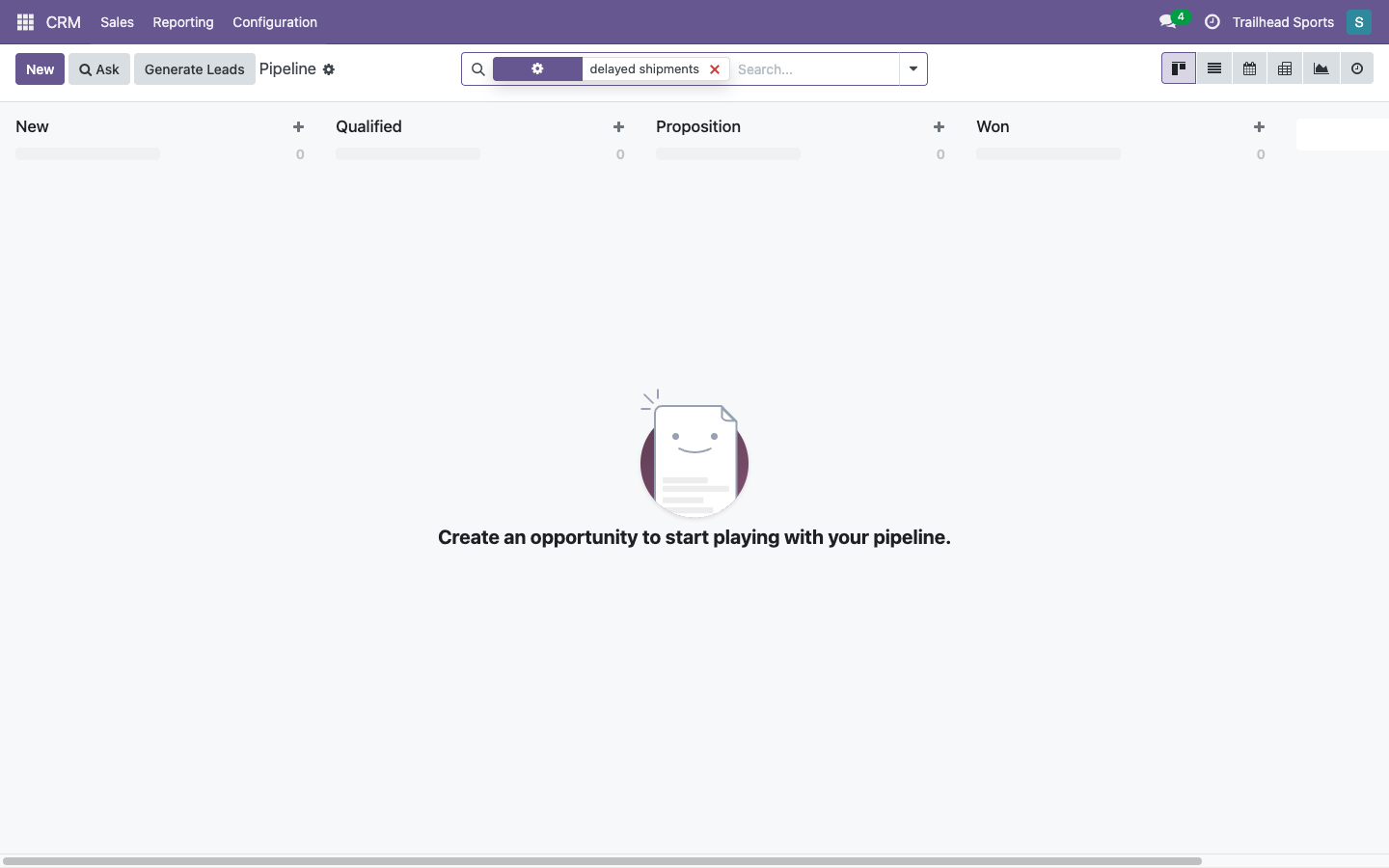
Every customer who complained about a late delivery is somewhere in your CRM. Try searching for "delayed shipments" and the pipeline comes back empty, because nobody wrote those words. They wrote "the goods arrived late", "consegne in ritardo", "Lieferung zu spät".
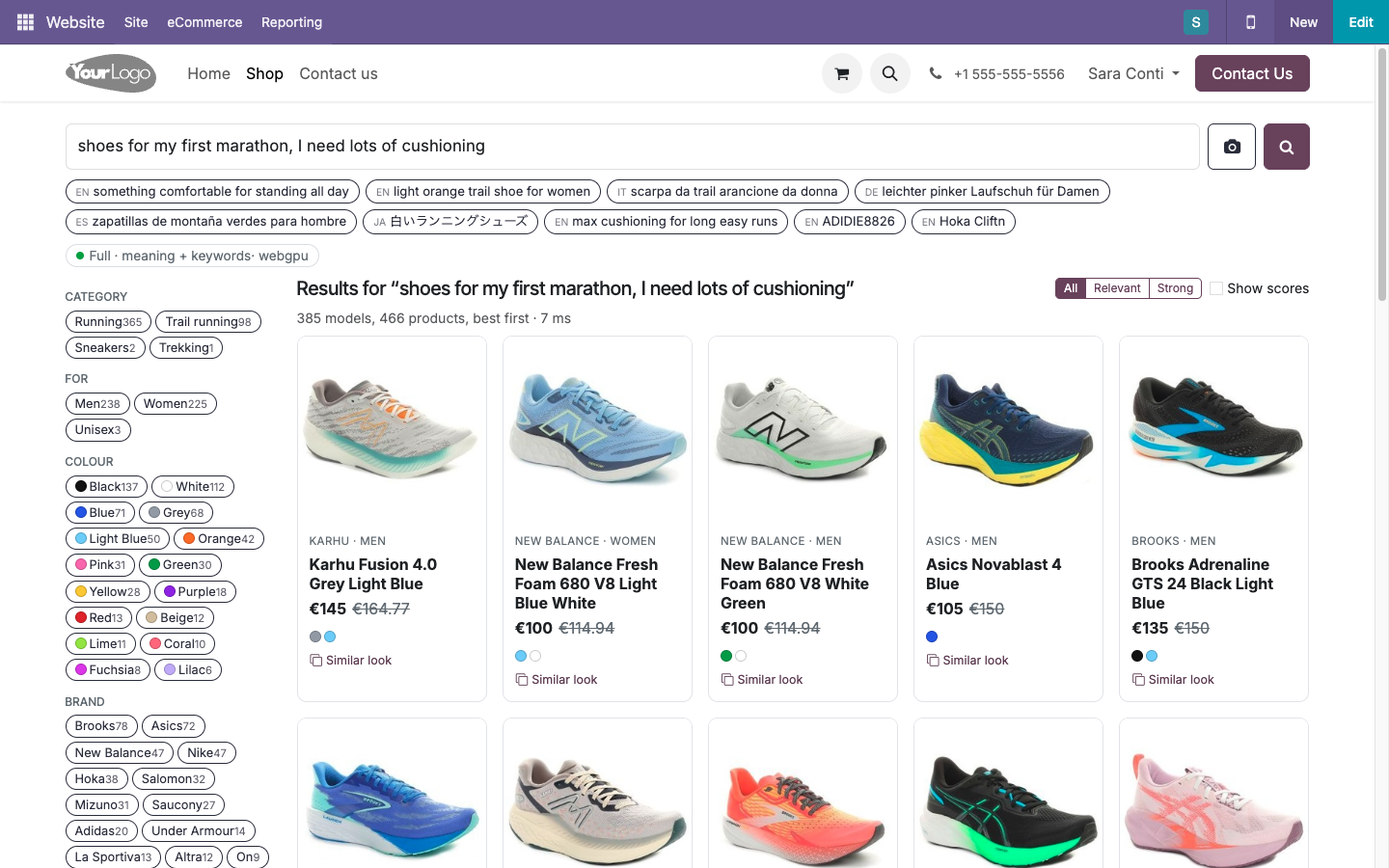
The standard Odoo search matches exact words in names and a few fields. The shop does the same: a customer who types "shoes for my first marathon, I need lots of cushioning" gets nothing, although the right shoes are in the catalogue.
The usual fix is server-side semantic search, and that is where most Odoo installations stop. It means PostgreSQL with pgvector, a service that computes embeddings, often a GPU, or a paid AI API that receives your customers' text with every query. None of this is available on Odoo.sh or on a small Community server, and for many companies sending CRM notes to a third party is not an option.
Semantic search on Odoo without dedicated hardware
The work moves from the server to the computers your team already uses. A modern laptop browser can run a compact language model, and that is enough to search thousands of records by meaning.
| Server-side semantic search | SeekySense for Odoo | |
|---|---|---|
| Database | PostgreSQL extension such as pgvector, to install and maintain | Standard Odoo database, unchanged |
| Compute | Embedding server, often with a GPU, sized for peak traffic | The user's browser, using the laptop's own graphics chip through WebGPU |
| AI provider | Paid API, billed per request, receiving your text | None. The engine is downloaded once and runs locally |
| Privacy of CRM notes | Notes and queries leave your infrastructure | Notes and queries stay in the user's browser |
| Odoo.sh and small Community servers | Usually not possible | Works, the server only serves JSON |
| Speed while typing | A network round trip for every query | Results in milliseconds, no server call |
| Access rights | Must be re-implemented in the vector store | Odoo record rules decide what each browser receives |
Six things your team can do from day one
These examples come from the demo video. The company is Trailhead Sports, a wholesaler of running and trail shoes with 240 opportunities, about 560 notes and 466 products. In every search below, the words typed do not appear in the records found.
Search the pipeline by meaning, or ask it a question
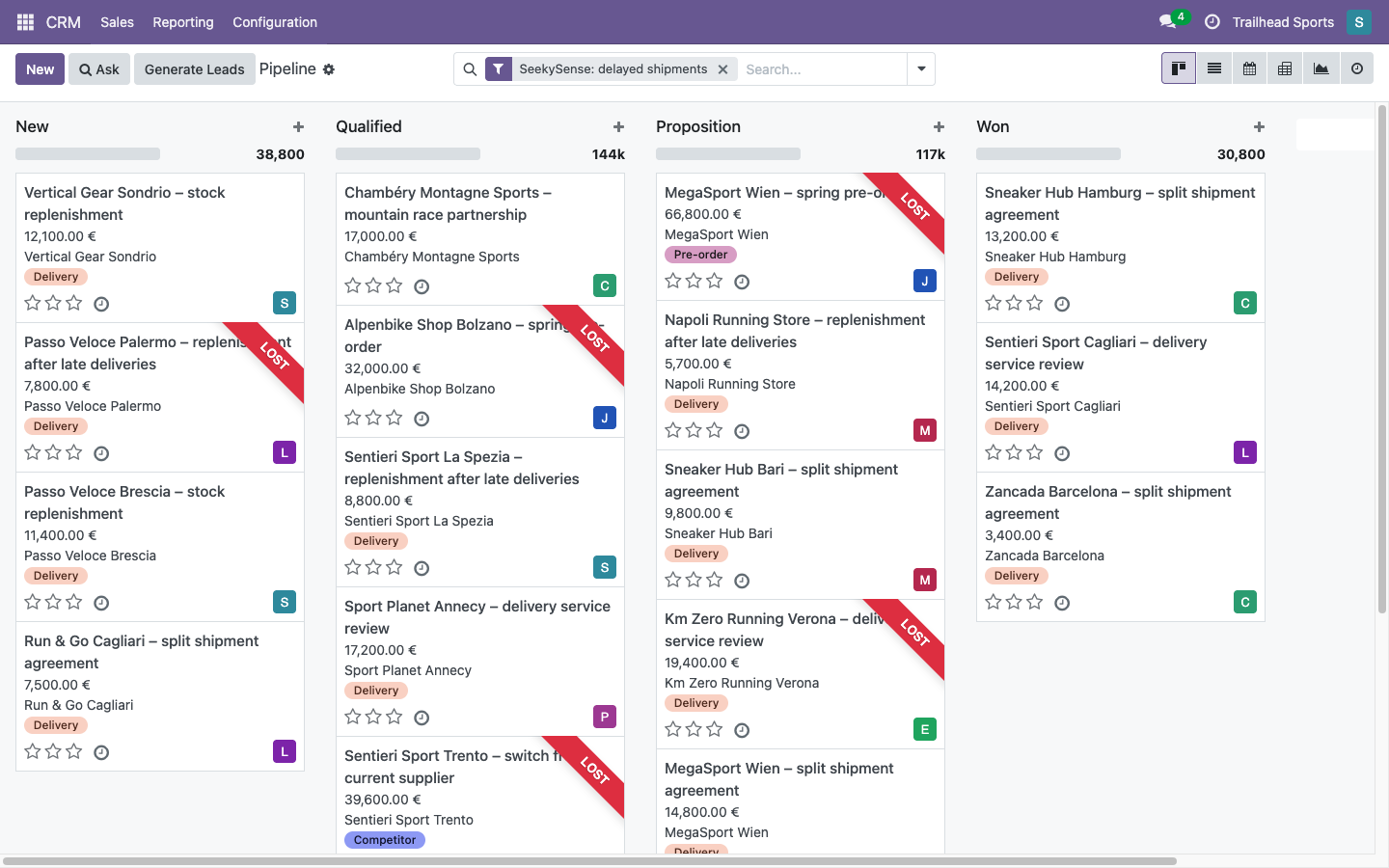
Type "delayed shipments" in the pipeline search bar. Next to the usual suggestions there is one more: Search by meaning. Pick it and the kanban shows the deals about late deliveries, such as "replenishment after late deliveries" and "split shipment agreement". The result is an ordinary Odoo facet: it combines with your other filters and can be saved as a favourite that re-runs on current data.
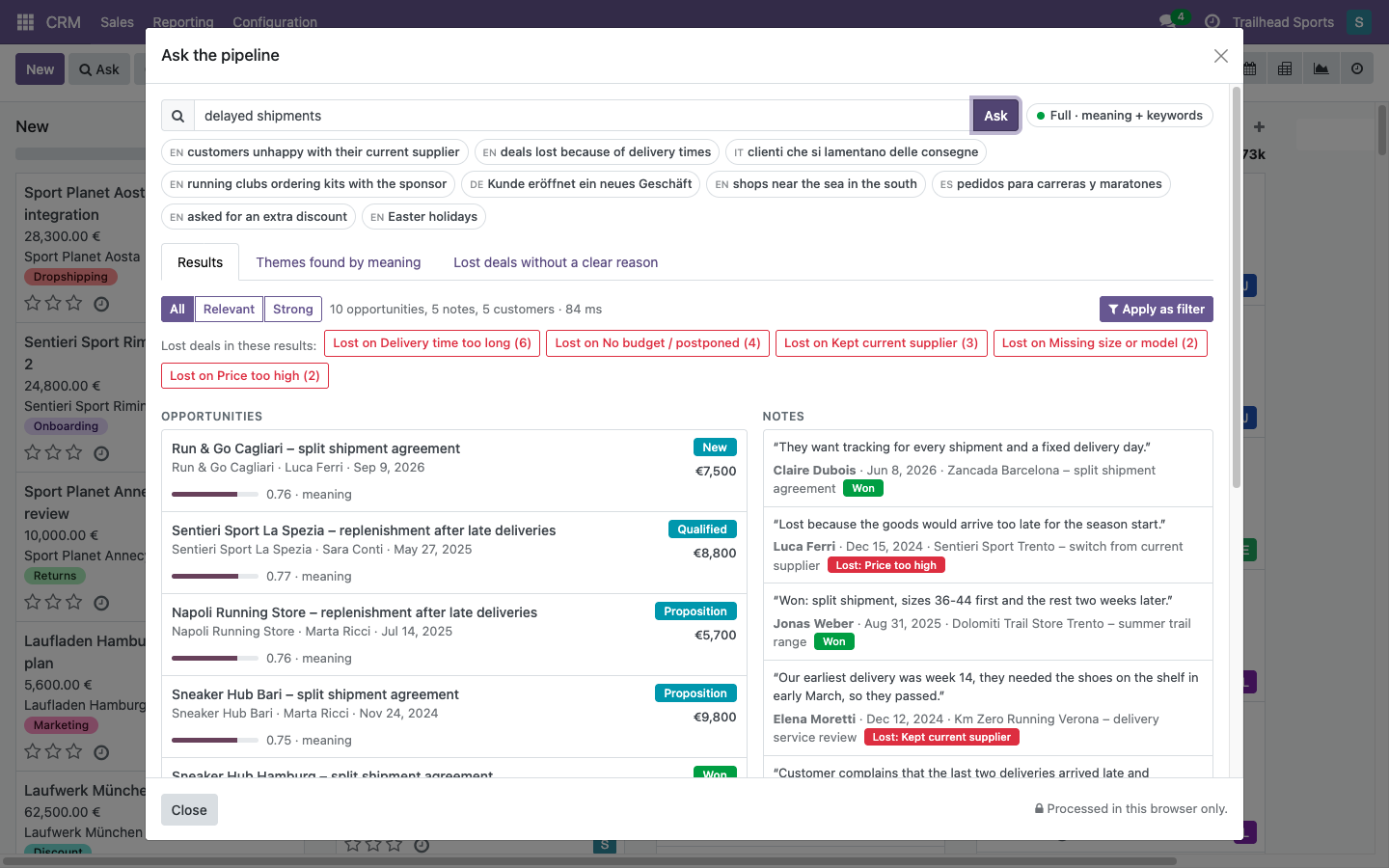
For a wider view, press Ask. The same question returns opportunities, notes and customers together, in this case 10 deals, 5 notes and 5 customers in 84 milliseconds. Lost deals are already grouped by reason, and the notes say it in their own words: "Lost because the goods would arrive too late for the season start", "Customer complains that the last two deliveries arrived late".
Similar deals appear while you write a new one
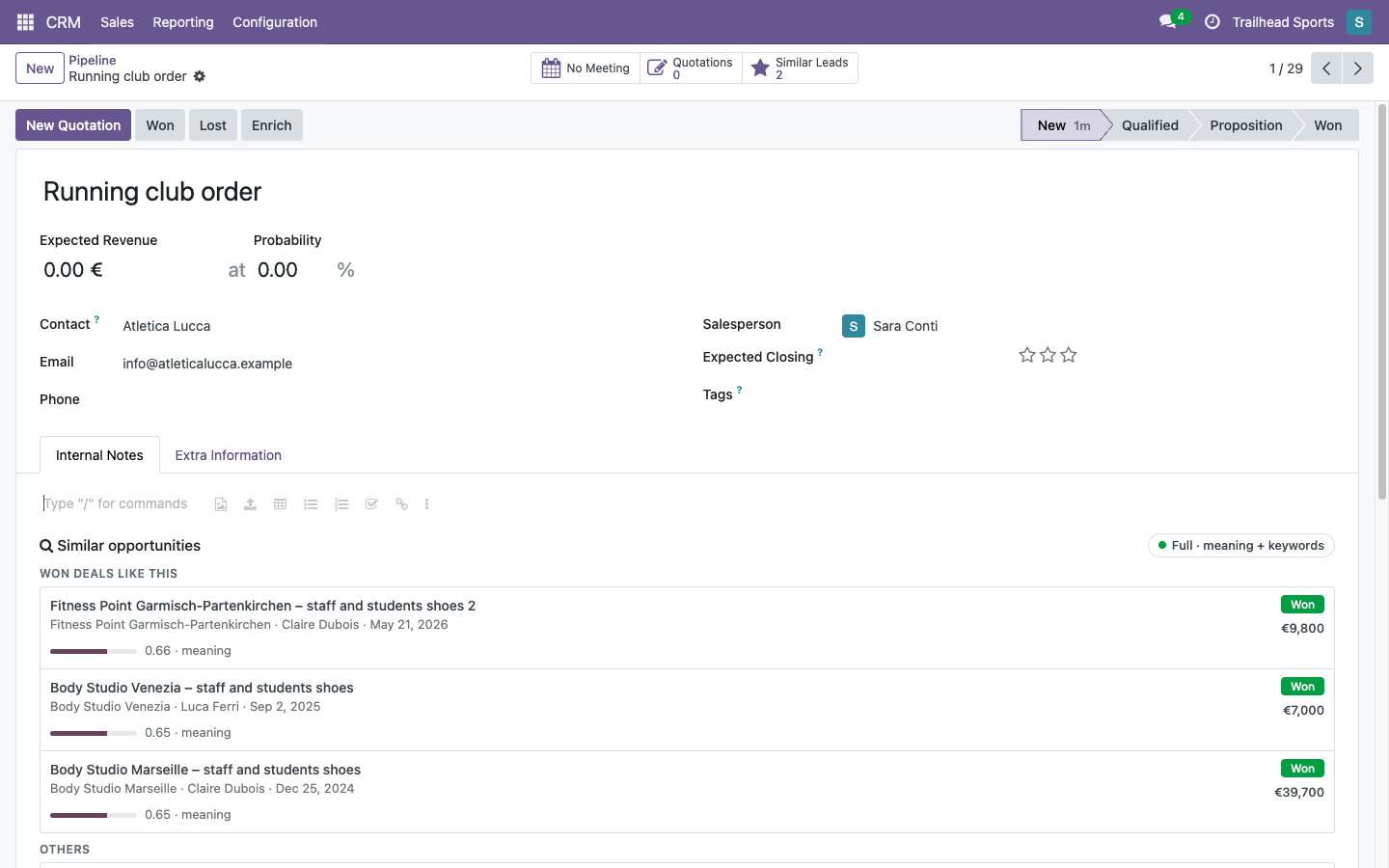
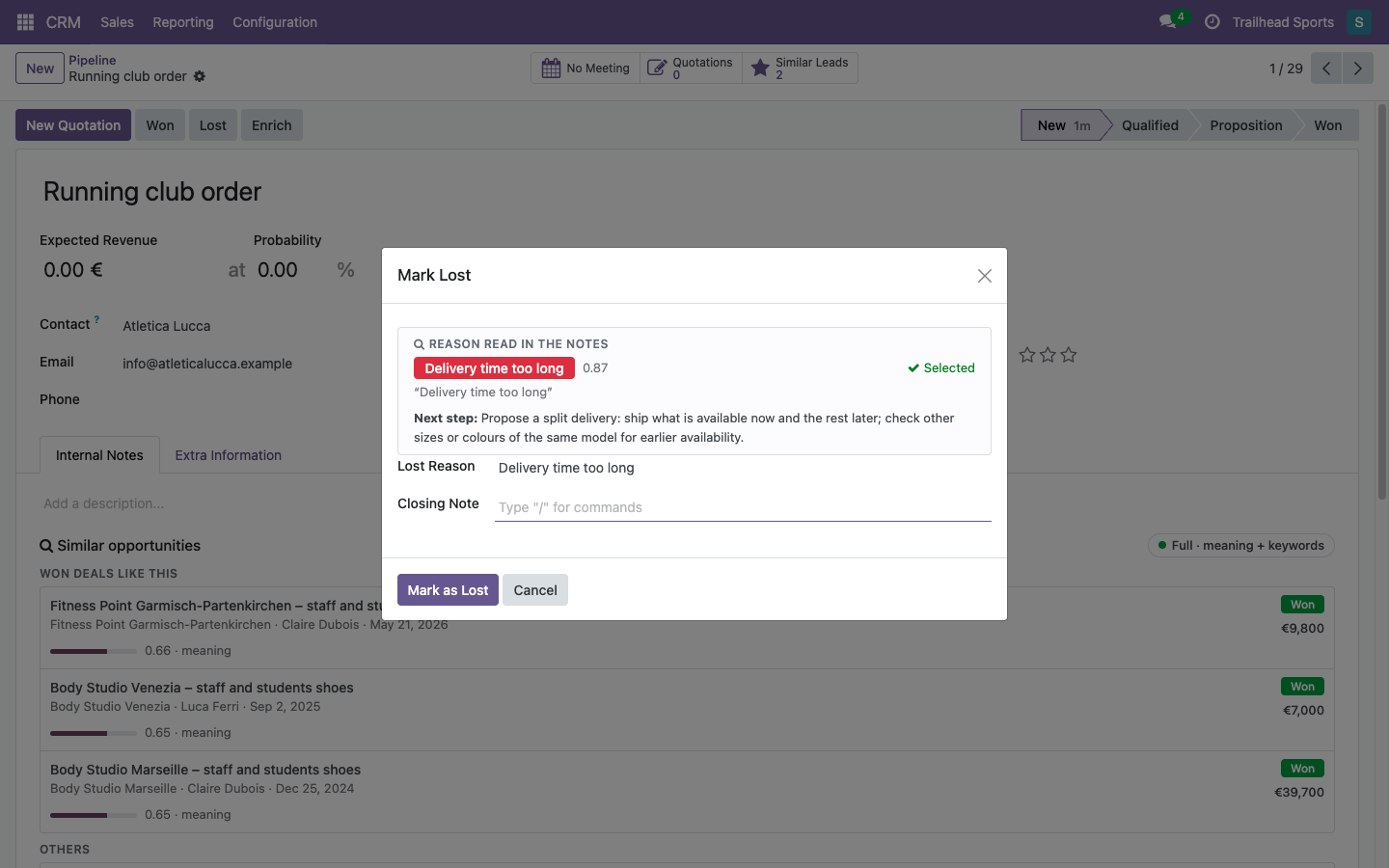
A salesperson creates a new opportunity, "Running club order", for a sports club. Below the description, SeekySense lists the deals that look like this one, won deals first, with what they were worth: Fitness Point Garmisch-Partenkirchen, Body Studio Venezia and Body Studio Marseille, all orders of shoes for staff and members.
The list follows what is typed in the description, and a second list shows what colleagues wrote in similar situations.
A new hire gets the experience of the whole team at the moment they need it, without asking around or knowing what to search for.
The lost reason is already in the notes
Press Lost on a deal whose notes say the delivery would come too late. The wizard already proposes Delivery time too long, marks it as selected and suggests the next step: propose a split delivery, ship what is available now and the rest later, and check other sizes or colours of the same model for earlier availability.
One click fills the field. The phrasings and the next steps are set by the sales manager in CRM configuration, so the suggestion follows your own sales process. Lost reasons stop being "Other" and start meaning something in your reports.
What do customers object to? Count it in plain words
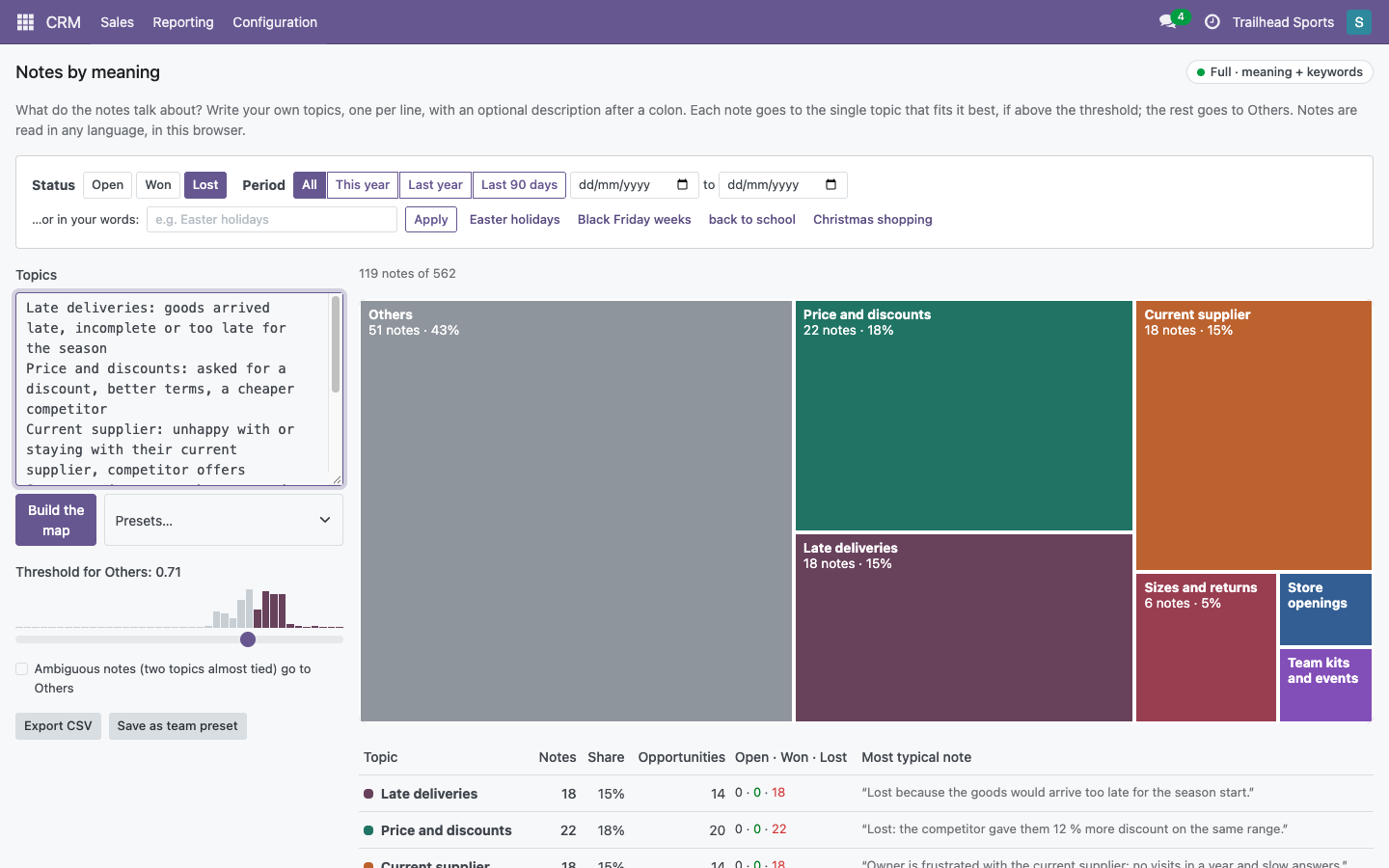
In CRM reporting, Notes by meaning takes a few lines of text, one topic per line, and places every note under the topic it fits best. In the demo the topics are late deliveries, price and discounts, current supplier, sizes and returns, store openings, team kits and events.
Filter to lost deals only: 119 notes of 562. Price and discounts lead with 22 notes, followed by late deliveries and the current supplier with 18 each. For every topic the table shows the most typical note, such as "Lost because the goods would arrive too late for the season start" or "Lost: the competitor gave them 12 % more discount on the same range". Click a topic to read its notes, best match first.
There are no tags to maintain and no categories to plan in advance. Change a line, rebuild the map. Periods can be written in words too, such as "Black Friday weeks".
Shop customers describe what they need
On the Odoo /shop page a customer writes "shoes for my first marathon, I need lots of cushioning". The grid shows cushioned road shoes: Karhu Fusion, New Balance 680, Asics Novablast, Brooks Adrenaline. None of them has "marathon" or "cushioning" in its name.
"Warm autumn colours" returns papaya, orange and dusty purple models. The colour is understood from the meaning, with no colour filter configured. Product codes and typos still work: an exact SKU comes first, and "Hoka Cliftn" finds the Hoka Clifton.
Brand and colour facets narrow the list instantly, because the filtering happens in the browser.
Or they show a photo
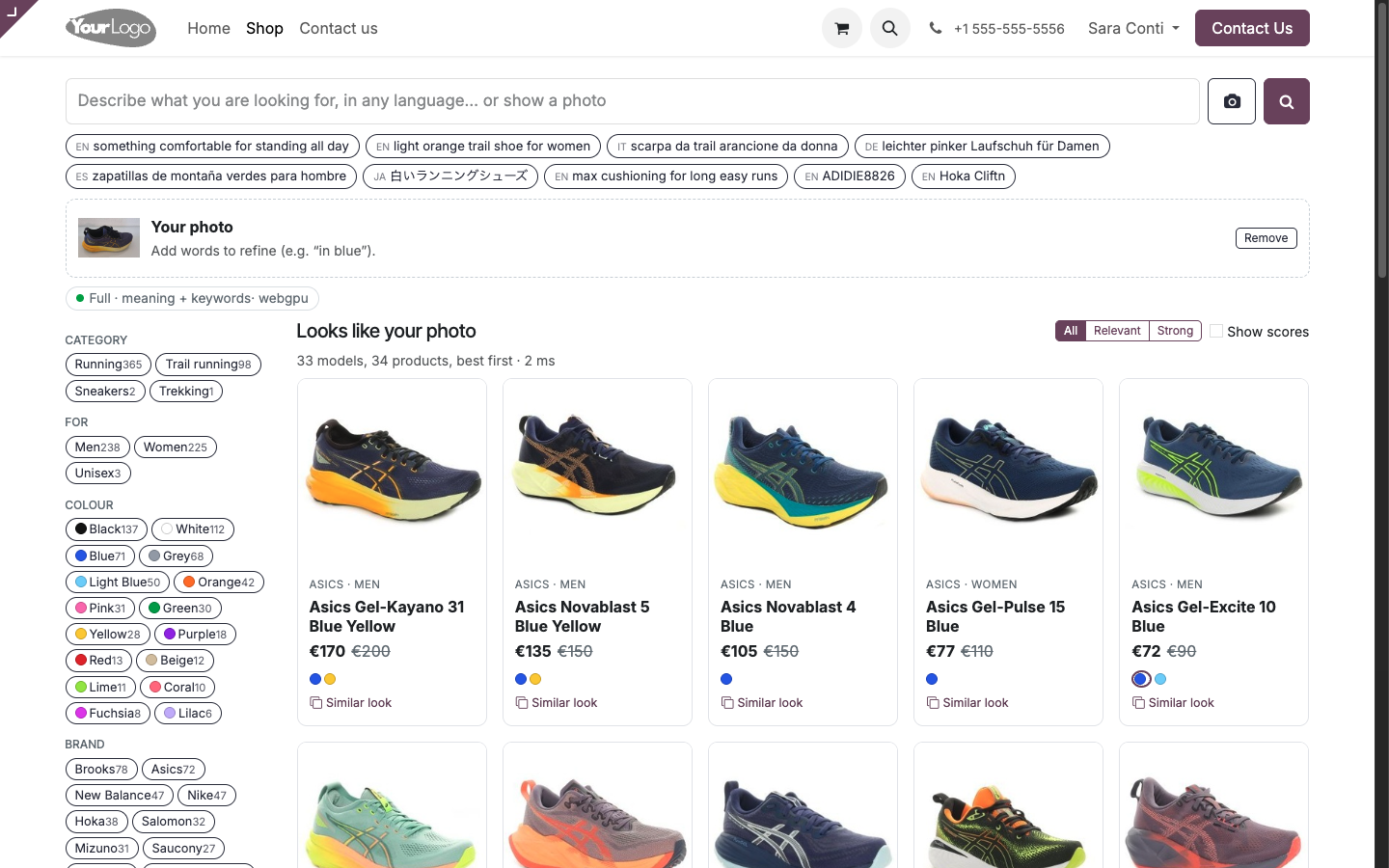
The customer drops a picture on the search panel, pastes a screenshot or uses the phone camera. Here the photo is a navy running shoe with an orange sole: in 2 milliseconds the shop answers with the models that look like it, Asics Gel-Kayano 31, Novablast 5, Novablast 4, Gel-Pulse 15 and Gel-Excite 10.
Words and photo work together: add a few words such as "in blue" to refine the list. Every product card has a Similar look button.
The shop answers in the customer's language. "Scarpe leggere da gara" in Italian returns light racing shoes, and the Full engine handles more than a hundred languages without translating the catalogue.
Also in the box
Periods written in words
In Pipeline by meaning, write "Easter holidays" and compare 2026 with 2025. SeekySense finds the right dates in each year, which move every spring. In the demo: 19 deals against 5, win rate 75% against 33%.
Pipeline grouped by topic
Labels such as store openings, team kits, events, delivery issues or price negotiations group every opportunity by what it is about. Click a tile to open the deals, or export a CSV.
Similar customers
On a company, a tab lists customers that look alike, with a one-line reason and the deals won with them. A practical hint for what to propose next.
Themes found by meaning
In the Ask dialog, a tab groups the notes by what they say, such as late deliveries, discounts or guaranteed dates, each with a button to filter the opportunities.
Lost deals with the wrong reason
A check lists lost opportunities whose notes tell a different story from the recorded reason, with suggestions you can apply in bulk.
Record rules respected
A salesperson who only sees their own deals only searches their own deals. Each user has a separate local index, cleared when someone else logs in.
Helpdesk tickets and the product catalogue, by meaning
The same engine also reads OCA Helpdesk tickets and the product, sales and purchase apps: similar tickets with what fixed them, incidents seen in the first hour, answers shown to customers before they open a ticket, quotations built from a customer's email, substitutes when a product is out of stock, vendor price lists reconciled, products found by photo.
See the helpdesk and product modulesWatch the demo in under 3 minutes
The CRM search bar, questions to the pipeline, similar deals, lost reasons, notes by meaning and the shop with photo search, on a standard Odoo 18.
Watch on YouTube · 2:39
Odoo serves the data, the browser does the AI
Odoo sends a light JSON feed
Only the records the user can read, with id and text. After the first time, only what changed since the last visit.
The browser understands the text
The SeekySense engine turns each record into a vector on the user's computer and stores it locally. For the demo CRM this takes 15 to 40 seconds, once. Keyword search works in the meantime.
Searches are answered on the spot
Every query combines meaning with exact words, so names, product codes and typos still land where they should. No request leaves the browser.
Two engines, chosen by the browser
Full: based on Google's EmbeddingGemma, about 200 MB downloaded once, more than 100 languages, photo search with about 100 MB more. It needs WebGPU, available in current Chrome and Edge and in Safari 26.
Lite: about 28 MB, English text, runs in any modern browser.
A consent dialog shows the size before the first download. Afterwards the engine starts from the browser cache in a few seconds. For closed networks, the engine files can be served from your own server.
The shop catalogue can ship with precomputed vectors, so a first-time visitor gets results by meaning as soon as the engine has started.
Installs like any Odoo app
Three addons, standard Odoo inheritance, no change to Odoo core or to the CRM and Website Sale apps.
| Addon | What it adds |
|---|---|
seekysense_core |
The in-browser engine, local index, consent dialog, status indicator and settings (Settings › SeekySense) |
seekysense_crm |
Search by meaning in the pipeline, similar deals, lost reason suggestions, similar customers, Pipeline by meaning and Notes by meaning reports |
seekysense_website_sale |
Smart search panel on /shop with search by description and by photo, instant facets, and the standard search one click away |
Uninstalling the addons leaves the standard CRM and shop exactly as they were.
Questions about SeekySense for Odoo
How can I add semantic search to Odoo without a GPU or pgvector?
Install the SeekySense for Odoo addons. Odoo sends each user a JSON list of the records they are allowed to read, and the SeekySense engine turns that text into vectors inside the user's browser, stores them in IndexedDB and answers queries locally. The Odoo server runs no AI model, so it needs no GPU, no pgvector and no external embedding API.
Does SeekySense send my CRM data to an AI provider?
No. Opportunities, notes, customers and search queries are processed in the browser of the person using Odoo. The only download is the engine itself, fetched once and then cached; it can also be served from your own server for offline or restricted networks.
Which Odoo version and edition does SeekySense support?
SeekySense for Odoo is developed and tested on Odoo 18 Community. It extends the standard CRM and Website Sale apps through normal inheritance, without changing Odoo core files. Because it needs nothing special on the server, it also suits Odoo.sh and small self-hosted instances. Contact us for Odoo 17, Odoo 19 or Enterprise.
Can Odoo search notes written in different languages?
Yes. With the Full engine a search such as "delayed shipments" also returns notes that say "consegne in ritardo" in Italian or "Lieferung zu spät" in German. The Full engine understands more than 100 languages.
Can customers search an Odoo shop with a photo?
Yes. On the /shop page a customer can upload, paste or take a photo, crop the product and get the closest items in the catalogue. Words can be added to the photo, such as "in blue", to re-order the results, and every product card has a Similar look button.
Does semantic search respect Odoo access rights?
Yes. Each user's browser only receives the records that Odoo record rules let that user read. A salesperson who sees only their own opportunities gets answers from those opportunities only. Each user has a separate local index, cleared when another user logs in on the same browser.
What hardware does the user's computer need?
A recent Chrome or Edge, or Safari 26, with WebGPU runs the Full engine (about 200 MB, downloaded once, more than 100 languages, plus about 100 MB for photo search). Any modern browser runs the Lite engine (about 28 MB, English text). No dedicated graphics card is required beyond the one already in an ordinary laptop.
Do I need to tag or categorise my CRM data first?
No. SeekySense works with the text already in Odoo: opportunity titles, descriptions, notes and product descriptions. Topics for reports are written in plain words when you need them and can be changed at any time.